
Think about the last time you bought a product or hired a service. What was the very first thing you did? You pulled out your smartphone and looked them up online. Whether you run a cozy coffee shop in Austin, Texas, a boutique law firm in Chicago, or an HVAC service in Miami, your potential customers are doing the exact same thing right now.
In today’s digital market, your digital storefront is often your only chance to make a lasting impression. While a simple social media profile might keep you in the conversation, taking advantage of expert website development services by Pro Brains Solutions ensures you own your digital space, build instant trust, and systematically turn casual clicks into loyal customers.
Navigating the web development landscape can feel overwhelming with endless choices in platforms, tools, and technical jargon. This guide cuts through the noise to help you build an online presence that outranks competitors on Google, impresses AI search engines, and accelerates your business growth.
Why Every Small Business Needs a Professional Website
If you think word-of-mouth or a local Facebook page is enough to sustain your growth, the numbers tell a very different story. Small business data reveals that over 81% of shoppers conduct online research before spending a single dollar.
Here is why investing in a custom, professional digital presence is a necessity:
- 24/7 Sales Engine: Your physical doors might close at 5:00 PM, but your website works around the clock to take bookings, collect leads, and make sales.
- Brand Ownership: Social algorithms change overnight. Your website is digital real estate that you fully own and control.
- Instant Credibility: Over 94% of a user’s initial impression comes down to your web design. A sleek, modern design signals that you run a modern, trustworthy operation.
- Local Search Dominance: When a customer in Denver searches for “best plumber near me” or “top tax advisor in Denver,” Google favors businesses with well-structured, active websites.
Define Your Website Goals Before Development
Before writing a single line of code or choosing a color scheme, pause and ask yourself: What is the actual job of this website?
When small business owners launch a site without clear objectives, they end up with a high-priced digital brochure that generates zero revenue. Define what success looks like for your business operations:
1. Lead Generation: Capturing names, emails, and phone numbers via quote request forms (ideal for contractors, legal services, and consultants).
2. Ecommerce Direct Sales: Selling physical or digital products straight to consumers nationwide or locally.
3. Brand Awareness & Local Foot Traffic: Educating local buyers, showing menu options or service lists, and driving foot traffic straight to your brick-and-mortar storefront.
4. Customer Support & Engagement: Providing instant FAQs, automated appointment scheduling, live chat, or dedicated client portals.
Aligning your design choices, content layout, and call-to-action buttons directly with these core goals saves time, reduces development costs, and ensures maximum return on investment.
Choose the Right Website Development Approach
When planning your project, you generally have three build paths. Each option balances cost, time, and custom functionality differently:
1. The DIY Route (Website Builders)
Using drag-and-drop builders like Wix or Squarespace allows non-technical business owners to launch a simple site quickly. However, you are often constrained by rigid templates, slower loading speeds, and limited custom features down the road.
2. Freelancers
Hiring an independent freelancer can lower upfront costs, but it often comes with inconsistent delivery times, variable code quality, and limited long-term technical support.
3. Professional Web Development Agency
Partnering with a dedicated web development agency gives you access to full-stack developers, professional UI/UX designers, copywriters, and SEO specialists. This approach delivers a scalable, highly secure, custom-tailored platform designed specifically to convert your target audience into buyers.
Select the Best Platform for Your Business
Selecting your content management system (CMS) or web framework forms the technical foundation of your digital strategy.
| Platform | Best Suitable For | Primary Strengths | Limitations |
|---|---|---|---|
| WordPress | Service Providers, Blogs, Local Businesses | Extremely customizable, vast SEO ecosystem, complete ownership | Requires regular plugin & core updates |
| Shopify | Pure Ecommerce Stores | Effortless store management, built-in payment processing, secure | Monthly subscription fees & transaction costs |
| Webflow | Design-Focused Brands | Visual design control, clean code generation, fast hosting | Steeper learning curve for non-developers |
| Custom Code (React / Node) | Web Apps, High-Scale Platforms | Unlimited scalability, high performance, bulletproof security | Higher initial investment & development timeline |
Essential Features Every Small Business Website Should Have
To stand out in competitive markets, whether in Seattle or Boston, your digital presence needs clear functional components that guide visitors toward becoming customers:
- Clear Value Proposition: A bold, clear headline above the fold explaining exactly what you do and how it solves the customer’s problem.
- Intuitive Navigation: Simple, clean header menus that let visitors find key services, pricing, and contact details in two clicks or fewer.
- Click-to-Call & Easy Contact Forms: Mobile-optimized buttons that let phone users call you instantly with one tap.
- Social Proof & Reviews: Embedded Google reviews, authentic client testimonials, and trust badges that immediately build buyer trust.
- Clear Calls to Action (CTAs): High-visibility buttons like “Get a Free Quote,” “Book Now,” or “Shop Today” placed strategically throughout every page.
Website Design Best Practices
Great web design is not about flashy animations; it’s about guiding visitor attention and removing friction. Modern web visitors decide whether to stay or leave within 0.05 seconds.
Keep your design clean and conversion-focused by limiting your visual palette to 2 or 3 brand colors and sticking to clean, readable typography. Use whitespace generously to let key text and calls-to-action breathe. Always showcase authentic high-resolution images of your real team, location, and work rather than relying heavily on generic stock photos that lower visitor trust.
Mobile-Friendly Website Development
Over 52% of all global web traffic originates from mobile devices. In the United States, mobile devices account for the vast majority of “near me” local service searches.
Google uses Mobile-First Indexing, meaning it evaluates the mobile version of your site to determine search engine rankings.
Make sure your buttons are touch-friendly, pop-ups don’t block mobile screens, and layouts automatically adapt seamlessly across screen sizes.
Improve Website Speed and Performance
Website speed directly impacts your conversion rates and search rankings. Studies show that a single one-second delay in page load time can reduce conversions by up to 7%.
Key Ways to Speed Up Your Site:
- Optimize Images: Compress all images using modern WebP formats before uploading them.
- Enable Caching & CDNs: Implement browser caching and leverage Content Delivery Networks (like Cloudflare) to deliver content quickly to local users.
- Minify Code: Clean up unnecessary JavaScript, CSS, and HTML bloat.
- Choose Reliable Hosting: Avoid ultra-cheap shared hosting servers that slow down during peak traffic hours.
SEO Best Practices for Small Business Websites
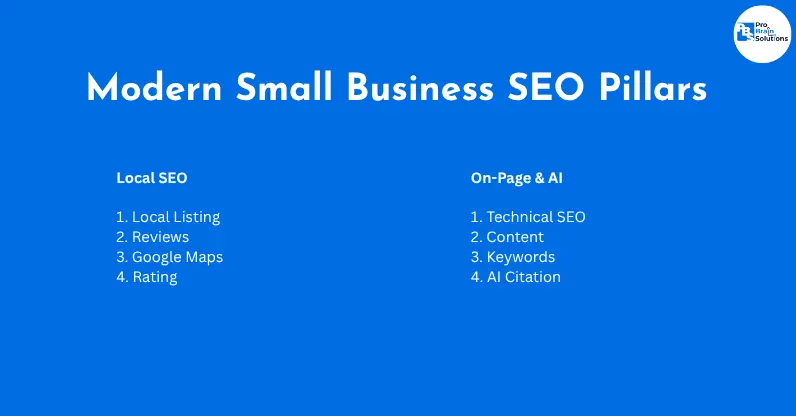
Search Engine Optimization (SEO) ensures your business gets discovered organically on search engines like Google and Bing, as well as AI-powered discovery platforms like Perplexity and ChatGPT.
On-Page SEO Essentials
Incorporate relevant primary and secondary keywords naturally into your H1s, subheadings, meta descriptions, and URL structures. Ensure your content directly answers common customer questions to earn featured snippets.
Local SEO Dominance
Claim and verify your Google Business Profile. Ensure your name, address, and phone number (NAP) details match across your website footer, contact page, and online directories. Build localized landing pages (e.g., “Commercial Plumbing Services in Phoenix, AZ”).
Schema Markup & Generative Engine Optimization (GEO)
Add Schema structured data (LocalBusiness markup) to your site’s code. Structured data helps both traditional search engines and generative AI models understand your exact business hours, pricing, physical address, customer reviews, and service lists.
Create High-Converting Website Content
High-converting website content focuses on the customer’s needs rather than just listing your company’s achievements.
When writing content for your landing pages, frame your features as direct customer benefits. Instead of writing “We offer 24/7 HVAC maintenance services,” reframe it around the value provided: “Never sweat through a hot summer night again; our 24/7 emergency HVAC team arrives in under an hour.”
Break long blocks of text into scannable sections with bold subheadings, short paragraphs, and bullet points. Clear, scannable formatting keeps readers engaged longer, signals high quality to search engines, and drives higher conversions.
Website Security and Data Protection
Cyberattacks do not target only large corporations. In fact, 43% of all cyberattacks target small businesses, primarily because smaller operations often lack proper security infrastructure. A compromised website can damage your hard-earned reputation, drop your Google rankings, and lead to costly downtime.
Always enforce HTTPS across your entire domain with an active SSL certificate. Implement automated weekly or daily cloud backups, set up a Web Application Firewall (WAF), and enforce strict Multi-Factor Authentication (MFA) for all administrative logins.
Website Maintenance and Regular Updates
A website is not a “set-it-and-forget-it” project. Outdated software, broken links, and expired security plugins invite cyber threats and hurt user experience.
Set up a monthly maintenance routine to test contact forms, clean up database bloat, update CMS cores and plugins, and remove outdated content. Regular updates signal to search engine crawlers that your site is active, secure, and worthy of top ranking spots.
Integrate Essential Business Tools
Your website should serve as the central hub of your digital operations by seamlessly integrating with your everyday software stack:
- Customer Relationship Management (CRM): Direct form submissions straight into tools like HubSpot, Salesforce, or Zoho to follow up with leads immediately.
- Email Marketing Platforms: Connect sign-up forms to Mailchimp or ActiveCampaign to build automated nurture campaigns.
- Booking & Scheduling Apps: Integrate Calendly, Acuity, or industry-specific booking engines so clients can schedule appointments directly on your site.
- Analytics & Tracking: Install Google Analytics 4 (GA4) and Google Search Console to monitor traffic, user flows, and keyword performance.
Common Website Development Mistakes to Avoid
Avoiding common development pitfalls saves your business time, money, and missed sales opportunities:
- Ignoring Mobile Usability: Designing solely for desktop computers while ignoring mobile user experience.
- Cluttered Layouts: Overwhelming visitors with aggressive pop-ups, clashing colors, and walls of text.
- Slow Page Speed: Uploading huge, uncompressed raw images directly from cameras or stock sites.
- Weak or Missing Calls-To-Action: Leaving visitors confused about what step to take next after reading your page.
- Hidden Contact Details: Burying phone numbers, address info, or support emails where visitors can’t easily find them.
Website Launch Checklist
Before making your new business website live, run through this technical pre-launch checklist:
- Cross-Browser Testing: Does the site render correctly on Chrome, Safari, Edge, and Firefox?
- Mobile Responsiveness: Have you tested all pages on actual smartphones and tablets?
- Form Functionality: Do form submissions successfully send lead notifications to your inbox?
- SSL Verification: Is the padlock icon showing HTTPS across all URLs?
- SEO Fundamentals: Are unique meta title tags, descriptions, and H1 tags present on every page?
- 404 Page Setup: Is a custom, helpful 404 error page configured for broken links?
- Analytics Setup: Are GA4 and Google Search Console tracking codes properly installed?
How to Measure Website Performance
Once your site goes live, track metrics that directly align with your business growth rather than focusing solely on vanity numbers:
Monitor your Organic Traffic Volume to see how many users find your site on search engines without paid ads. Track Conversion Rate, the percentage of visitors who complete a form, place a call, or buy a product. Keep an eye on Bounce Rate & Time on Page to ensure your content holds reader interest, and measure Cost Per Lead (CPL) to evaluate the efficiency of your digital marketing campaigns.
Future Trends in Small Business Website Development
Web development moves quickly. Staying ahead of modern technical trends ensures your business keeps its competitive edge:
1. Generative Engine Optimization (GEO) & Search
Search behavior is evolving beyond traditional search results. AI models like ChatGPT, Claude, and Google Gemini provide direct answers to complex queries. Websites structured with clear headings, authoritative content, and schema markup are more likely to be cited as top sources by AI engines.
2. AI Chatbots & Instant Assistants
Modern AI chatbots provide nuanced, human-like customer support, answer product questions instantly, and qualify leads 24/7 without requiring manual human intervention.
3. Hyper-Personalization
Dynamic websites adapt content, banners, and call-to-action buttons based on a visitor’s physical location, device type, or past browsing behavior on the site.
Wrapping Up: Take Control of Your Digital Storefront
Your website is the foundation of your entire digital marketing ecosystem. A modern, fast, and SEO-optimized site works around the clock to build brand trust, outperform local competitors, and drive reliable revenue growth.
Whether you are launching a new startup or upgrading an outdated site, taking a strategic approach to web development positions your business for long-term success on search engines and modern AI platforms alike.
Frequently Asked Questions
1. How much does a small business website cost in the USA?
A basic small business website built on a template usually ranges from $1,500 to $3,500. A fully custom, professionally developed, SEO-optimized business website with custom integrations typically ranges between $4,000 and $10,000+, depending on feature complexity and e-commerce requirements.
2. How long does it take to develop a small business website?
A standard 5-to-10 page small business website takes about 4 to 8 weeks from initial discovery to final launch. Complex e-commerce platforms or custom web applications may require 10 to 16 weeks.
3. What is the best platform for a small business website?
WordPress is ideal for service businesses that want complete ownership, flexibility, and strong SEO capabilities. Shopify is the top choice for online stores focused on e-commerce, while Webflow suits design-focused brands wanting clean visual layouts without heavy code.
4. How often should a small business update its website?
Core software and security plugins should be updated monthly. You should review and refresh page content, check broken links, and update SEO keywords quarterly, while launching major design overhauls every 2 to 3 years to stay visually competitive.
5. Why is mobile-friendly web development so important?
Over half of all web traffic comes from mobile devices, and Google relies on mobile-first indexing to rank pages. A site that is not optimized for mobile frustrates users, loses search rankings, and directly misses out on local customer leads.